
Array Methods You Must Know

JavaScript arrays are powerful tools for managing collections of data. They come with a wide range of built-in methods that allow developers to manipulate, transform, and interact with array elements.
Arrays can hold any type of data-such as numbers, strings, objects, or even other arrays—making them a flexible and essential part of JavaScript programming.
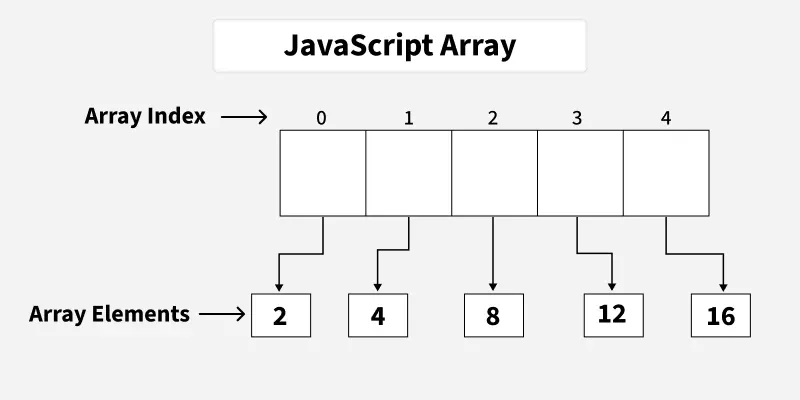
Example:
If you have a list of items (a list of car names, for example), storing the cars in single variables could look like this:
let car1 = "Saab"
let car2 = "Volvo"
let car3 ="BMW"
JavaScript push() Method
The push() method adds one or more elements to the end of an array and returns the new length.
let a = ['Hello','GFG','JS'];
a.push('React');
console.log(a);
Output [ 'Hello', 'GFG', 'JS', 'React' ] In this example
The push() method adds 'React' to the end of the array a.
Initial array: ['Hello', 'GFG', 'JS']
After push(): ['Hello', 'GFG', 'JS', 'React']
JavaScript pop() Method
The pop() method removes the last element from an array and returns it.
let a = ["Hello", "GFG", "JS"];
let ele = a.pop();
console.log(ele);
console.log(a);
Output
JS
[ 'Hello', 'GFG' ]
In this example
The pop() method removes the last element from the array and returns it.
Removed element (ele): "JS"
Updated array (a): ["Hello", "GFG"]
JavaScript shift() Method
The shift() method removes the first element from an array and returns it.
let a = ["Hello", "GFG", "JS"];
let ele = a.shift();
console.log(ele);
console.log(a);
Output
Hello
[ 'GFG', 'JS' ]
In this example
Removed element (ele): "Hello"
Updated array (a): ["GFG", "JS"]
unshift() Method
The unshift() method is used to add the elements in the array from the front side.
let a = ["Hello", "GFG", "JS"];
a.unshift("React");
console.log(a);
Output
[ 'React', 'Hello', 'GFG', 'JS' ]
In this example
The unshift() method adds "React" to the beginning of the array a.
Updated array: ["React", "Hello", "GFG", "JS"]
JavaScript indexOf() Method
The indexOf() method is used to find the index of a particular element in an array.
let a = ["Hello", "GFG", "JS"];
console.log(a.indexOf('GFG'));
Output
1
In this example
The indexOf() method returns the index of the first occurrence of 'GFG' in the array a.
Output: 1 (since 'GFG' is at index 1).
JavaScript includes() Method
The includes() method is used to check whether the array contains the specified element or not.
let a = ["Hello", "GFG", "JS"];
console.log(a.includes("GFG"));
console.log(a.includes("React"));
Output
true
false
In this example
a.includes("GFG") returns true (since "GFG" is in the array).
a.includes("React") returns false (since "React" is not in the array).
JavaScript concat() Method
The concat() method is used to concat or basically join two different arrays from end to end.
let a1 = ["Hello","GFG", "Js"];
let a2 = ["React"];
let new = a1.concat(a2);
console.log(a1);
console.log(a2);
console.log(new);
Output:
[ 'Hello', 'GeeksforGeeks', 'JavaScript' ]
[ 'React' ]
[ 'Hello', 'GeeksforGeeks', 'JavaScript', 'React' ]
In this example
The concat() method merges a1 and a2 into a new array without modifying the original arrays.
a1: ["Hello", "GFG", "Js"] (unchanged)
a2: ["React"] (unchanged)
new: ["Hello", "GFG", "Js", "React"] (merged array)
JavaScript forEach() Method
The forEach() works as a loop over an array where for every element the function just runs once only.
let a = ["Hello", "GFG", "JS"];
a.forEach(function (element) {
console.log(element)
});
Output
Hello
GeeksforGeeks
JavaScript
In this example
- The forEach() method iterates over each element in the array a and executes the provided function for each element.
JavaScript sort() Method
The sort() method sorts the elements of an array in alphabetical order in ascending order.
let a = ["Hello", "GFG", "JS"];
console.log(a);
a.sort();
console.log(a);
Output
[ 'Hello', 'GeeksforGeeks', 'JavaScript' ]
[ 'GeeksforGeeks', 'Hello', 'JavaScript' ]
In this example
a = ["Hello", "GFG", "JS"]; initializes an array with strings.
console.log(a); prints the original array.
a.sort(); sorts the array in alphabetical order, modifying it in place.
console.log(a); prints the sorted array.
JavaScript map() method
The map() method iterates over an array, transforms the array according to user-specified conditions and returns a new array.
let a1 = [1, 2, 3, 4, 5];
console.log(a1);
let a2 = a1.map(function (elem) {
return elem * 5;
});
console.log(a2);
Output
[ 1, 2, 3, 4, 5 ]
[ 5, 10, 15, 20, 25 ]
In this example
a1 = [1, 2, 3, 4, 5]; initializes an array.
console.log(a1); prints the original array.
a1.map(function (elem) { return elem * 5; }); creates a new array a2 where each element is multiplied by 5.
console.log(a2); prints the modified array.
JavaScript reduce() Method
The reduce() method uses a reducer function that reduces the results into a single output.
let a1 = [1, 2, 3, 4, 5];
console.log(a1);
let sum = a1.reduce(
function (acc, elem) {
return acc + elem;
});
console.log(sum);
Output
[ 1, 2, 3, 4, 5 ]
15
In this example
a1 = [1, 2, 3, 4, 5]; initializes an array.
console.log(a1); prints the original array.
a1.reduce(function (acc, elem) { return acc + elem; }); calculates the sum of all elements in a1 using reduce.
console.log(sum); prints the sum of the array elements.
JavaScript Array reverse() Method
The reverse() method is used to reverse the order of the elements in an array.
let a = [1, 2, 3, 4, 5];
a.reverse();
console.log(a);
Output
[ 5, 4, 3, 2, 1 ]
In this example
a.reverse(); reverses the order of elements in the array a in place.
console.log(a); prints the reversed array.
Javascript Array every() method
The every() method is used to check if all elements in the array pass the test implemented by the provided function. It returns a boolean value true if all elements satisfy the test otherwise returns false.
const a = [2, 4, 6];
const isEven = (num) => num % 2 === 0;
const allEven = a.every(isEven);
console.log(allEven);
Output
true

